How do I buy an AIandMe subscription?
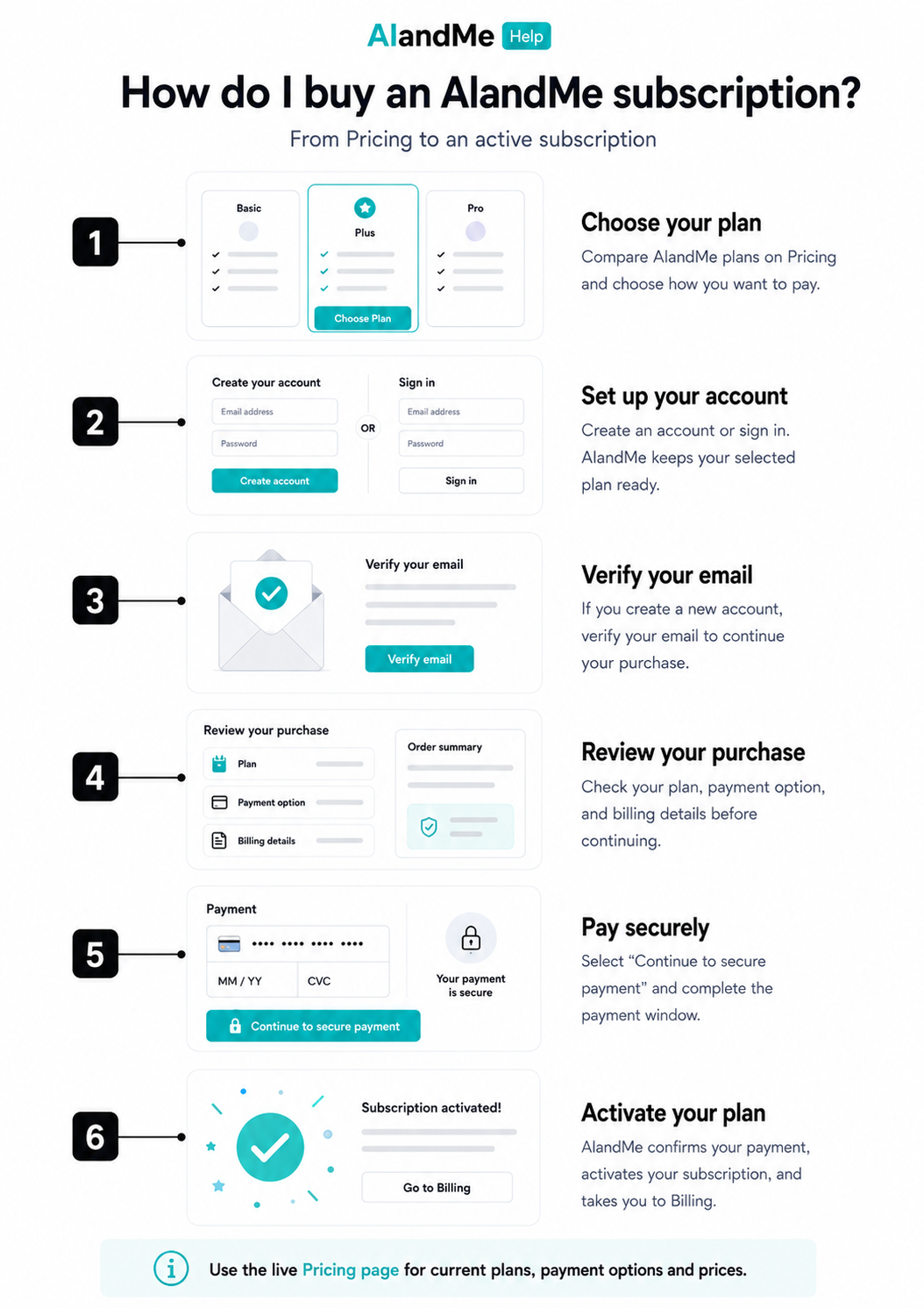
Buying an AIandMe subscription starts on Pricing. Choose your plan and payment option, set up or sign in to your account, review your purchase, and complete secure payment. AIandMe then confirms your payment and activates your subscription.
-
Choose your plan
Open Pricing and compare the plans currently available.
Each plan has a Payment option selector. Depending on the plan, you may see pay-once or recurring choices. Select the option you want, review the current price and billing details, then select Buy a plan.
Pricing is the source for current plans, payment options, prices and savings.
If you already have an active plan, AIandMe will not start another ordinary plan purchase. Use the option shown to view your current plan instead.
-
Set up or sign in to your account
If you are signed out, AIandMe opens Continue your purchase and keeps your selected plan and payment option ready.
Choose Continue with Google to use a Google account. AIandMe returns you to the selected plan and payment option after sign-in.
Choose Create an account if you are new to AIandMe and want to register with email and password.
Choose I already have an account if you already have one.
When creating an account, complete the requested account, contact and Indian address information.
If you are already signed in and do not have an active plan, AIandMe takes you directly to Checkout.
-
Verify your email
If you create a new email/password account, AIandMe sends a verification email to the address you provided. Google sign-in uses Google's verified email and does not send an additional AIandMe verification email.
Open the email and use the verification link.
When you began from Pricing, successful verification signs you in and continues your purchase with the plan and payment option you selected.
If your verification link has expired, use Resend verification email on the verification page.
-
Review your purchase
On Checkout review, check your:
- plan;
- payment option;
- amount; and
- billing details.
You can edit the billing details for this purchase. These edits do not change your Profile. Your account email stays read-only and the country remains India.
If AIandMe does not yet have a student-use statement for the account, choose the statement that applies. Read and accept the required terms. Also confirm that you are authorised to make the purchase for the student. If the student is under 18, a parent or lawful guardian should authorise the purchase.
If you have a partner code, open Have a partner code?, enter the Partner Code, and select Apply. Check the amount shown after applying the code before you continue.
If you selected the wrong plan or payment option, return to Pricing and choose again.
-
Complete secure payment
When everything is correct, select Continue to secure payment.
AIandMe prepares the payment and opens the secure payment window. Complete the payment using the options shown there.
Keep the Checkout page open while AIandMe receives and verifies the payment result.
After a successful payment, AIandMe verifies the payment and begins activating your plan.
Do not start another payment while AIandMe is checking the payment or activating your access.
-
Wait for your plan to activate
Once your access is ready, AIandMe takes you to your Billing history.
Welcome to AIandMe confirms that your plan is active.
Your Invoice may still be preparing immediately after activation. It becomes available from Receipts & Payments when it is ready.
Payment completed, but my plan is still activating
If Checkout says your payment was received but AIandMe is still finishing setup, do not make another payment.
Activation continues automatically. You can safely leave the page and check Receipts & Payments for your current status.
If activation does not complete, follow the support guidance shown on Checkout.
What happens next
After your plan is active, open AIandMe Home and start learning in AI Study Room overview.
Use AI Credits when you want to check your current AI Credit balance and usage.
Your Invoice appears in Receipts & Payments when it is ready.