How do I learn from questions I got wrong or guessed?
Getting a question wrong can be useful if you understand why it went wrong.
The same is true for a question you answered correctly but were unsure about.
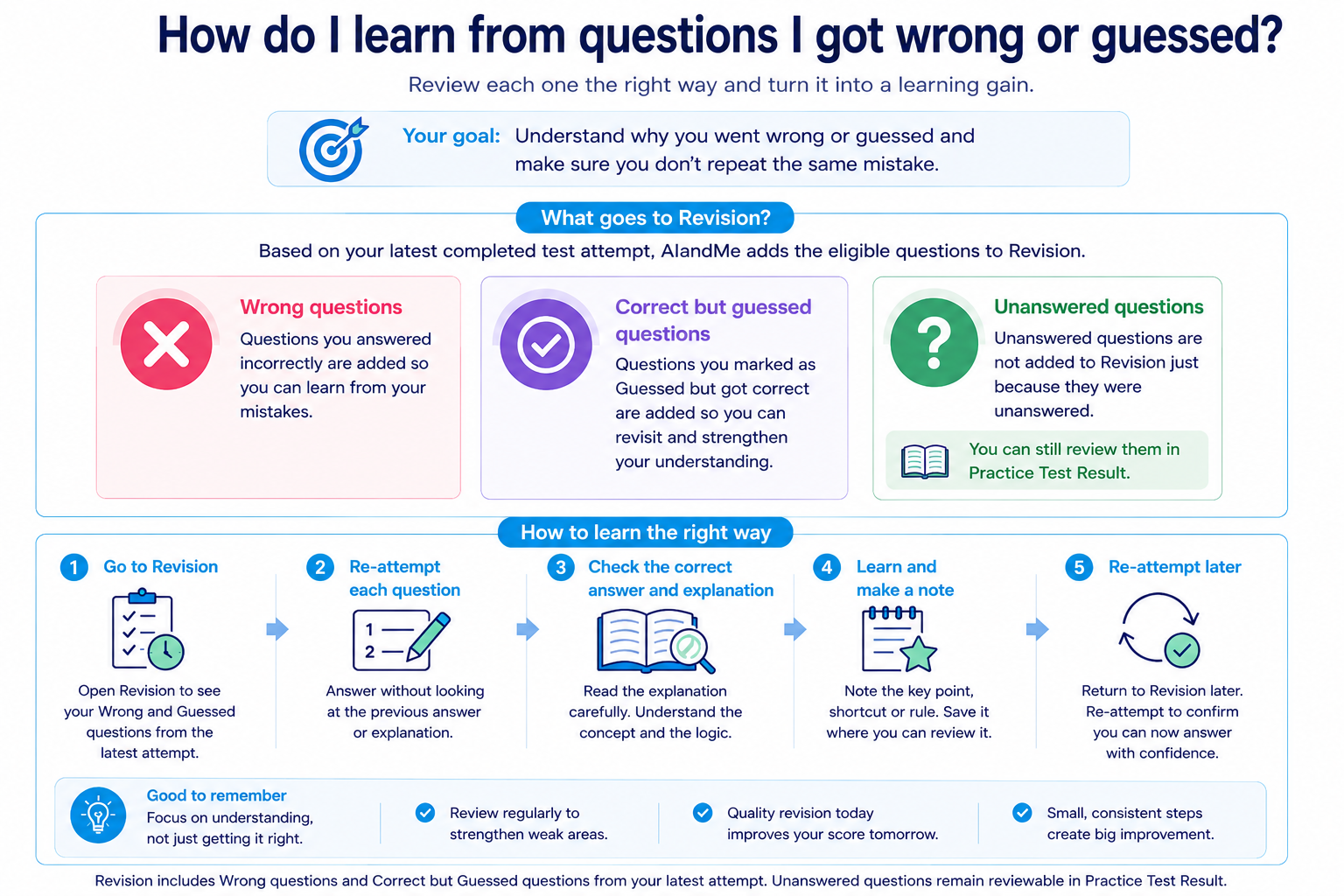
AIandMe lets you mark questions Guessed, review completed answers, use explanations where available and bring questions that need another attempt back in a Revision test.
A useful routine is:
Notice the mistake or uncertainty → understand it → return to the learning if needed → practise it again.
-
Treat a wrong answer as information
When you get a question wrong, don't stop at the correct option.
Ask:
- Did I misunderstand the concept?
- Did I forget something I had learned?
- Did I misread the question?
- Did I use the wrong method?
- Did I make a calculation mistake?
- Did I rush?
- Was I choosing between options without being sure?
Two wrong answers can need different fixes, so find the reason behind each result.
-
Mark Guessed when you are not confident
Sometimes you choose the correct answer without really knowing why.
That is important information too.
During a Practice Test, use Guessed when you answer but are unsure.
Marking Guessed does not reduce your marks. It records that you were uncertain about the answer.
This means a question can be:
Correct — but still worth revisiting.
Learn more about Inside Your Practice Test and which questions can enter a Revision test.
-
Review the question after the test
After completing a Practice With AI test, open your Practice Test Result.
Look at the questions that deserve another look, particularly:
- incorrect answers;
- Guessed answers;
- questions that took unusually long;
- fast incorrect answers;
- repeated mistakes from the same chapter or section.
For each one, try to identify the reason before moving on.
The aim is to find something you can change before the next attempt, not collect a list of mistakes.
Testing Insights can help you find broader patterns across completed tests.
-
Understand why the checked answer works
When an eligible checked answer needs more explanation, Explain With AI can help explain the idea and reasoning and may include useful steps, formulas or common mistakes.
Use it to understand the solution rather than simply memorising the final answer.
AI explanations can be imperfect. When something does not look right or still feels unclear, check it against your learning material and return to the relevant concept.
-
Go back to AI Study Room when the concept is the problem
Sometimes the question is not the real problem.
It exposed a gap in the learning underneath it.
Return to the relevant AI Study Room section.
Use:
- Read when you need the detailed explanation again;
- Revise when you need to refresh the important ideas;
- Ask AI when you can identify the exact part that is confusing you.
A useful Ask AI question might be:
“I got this type of question wrong because I confused these two ideas. Can you explain the difference?”
That is more useful than simply asking for the correct answer again.
-
Look for patterns, not just individual mistakes
One wrong question may be a careless error.
Several similar mistakes may tell you something more useful.
As you complete Practice With AI tests, Testing Insights can bring together incorrect and Guessed questions. Once you have enough results, it can show wider testing patterns.
Look for things such as:
- repeated mistakes in one chapter;
- one section appearing often in your review;
- fast incorrect answers;
- low accuracy in a subject;
- several Guessed questions around the same concept.
A pattern is often a better reason to change your study plan than one isolated result.
-
Use Revision tests to practise the question again
Questions from completed Practice Tests can come back in a Revision test when your latest completed attempt shows that you:
- answered the question incorrectly; or
- answered it correctly but marked it Guessed.
This lets you practise questions that currently deserve another attempt.
A Revision test uses your completed-test history to focus on those questions.
-
Know what does not enter your Revision test
An unanswered question is not added to the Revision pool simply because you left it unanswered.
Revision focuses on questions you attempted and most recently got wrong or marked Guessed.
If you later answer the same question correctly without marking it Guessed, it may stop appearing because your latest completed attempt now shows a confident correct answer.
Revision changes with your more recent work instead of becoming a permanent list of every mistake you have made.
-
When you answer correctly again, check whether the reason changed
The purpose of revision is not only to turn a red answer into a green answer.
Ask yourself:
- Do I now understand why it is correct?
- Could I explain the method?
- Am I more confident?
- Could I answer a different question using the same idea?
If the answer is yes, the revision has probably done something useful.
If you are still guessing, return to the learning again.
-
Turn mistakes into a repeatable learning cycle
A useful mistake-review routine is:
Finish the test → Find Wrong and Guessed questions → Understand why they happened → Use Explain With AI or return to the learning → Practise eligible questions in a Revision test → Check whether your reasoning has improved
Mistakes are most valuable when they change what you do next.
The goal is not to avoid ever getting a question wrong.
The goal is to make sure the same misunderstanding does not keep returning without being noticed.