How should I use NEET PYQs while learning a chapter?
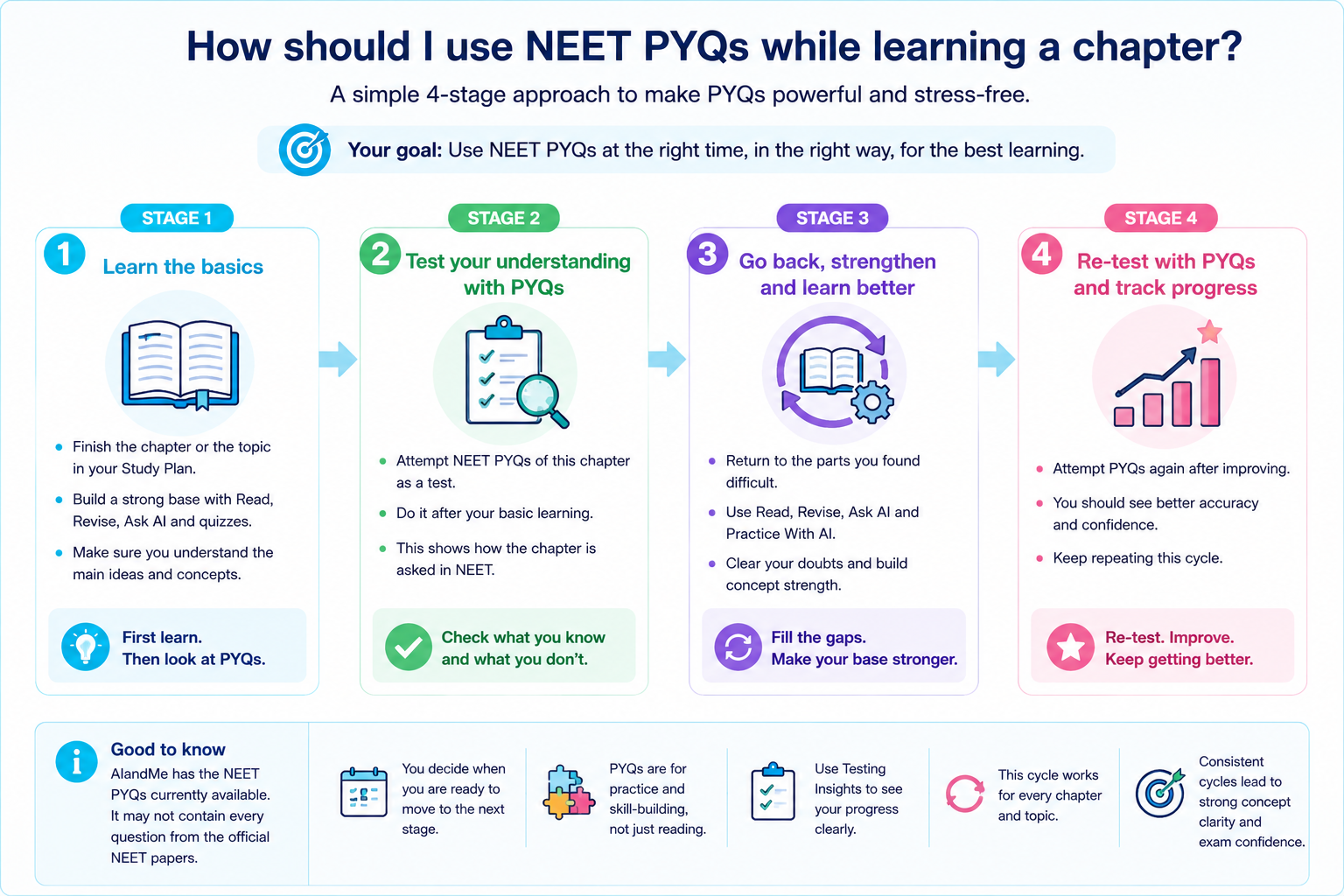
Previous Year Questions are useful because they show you how ideas have actually appeared in earlier NEET exams.
PYQs are most useful when they are connected to your learning. Instead of saving a large collection for the end of your preparation, use them while studying a chapter to see how its concepts have been tested before.
AIandMe gives you two ways to work with available NEET PYQs:
- view questions connected to the chapter or section you are studying in AI Study Room; and
- create a NEET PYQ test in Practice With AI when you want to practise them as a test.
-
Learn the concept before trying to memorise question patterns
Start with the chapter or section you want to learn.
Use your Study Plan, Read, Revise and Ask AI as needed to understand the material.
PYQs can show you how NEET has asked about a concept before, but they should not replace learning the concept itself.
If you only remember how an old question was answered, a different question on the same idea may still cause difficulty.
A better goal is:
Understand the concept first → then use PYQs to see how that understanding is tested.
-
Check the NEET connections for the chapter
In a supported Physics, Chemistry or Biology chapter, use the NEET Dashboard and NEET syllabus items table to understand how the chapter and its sections connect to the current NEET syllabus.
AIandMe also uses mapped past NEET questions to show where previous questions are connected to the chapter and sections.
This can help you ask:
- Which sections of this chapter have mapped NEET questions?
- Which syllabus items are connected to the section I am studying?
- Which areas have appeared more often in the available past questions?
- Where might it be useful to spend extra revision time?
Historical frequency is useful context. It is not a prediction of what will appear in your future NEET exam.
-
Look at mapped PYQs while you are studying
When past questions are available for a section, View Questions in AI Study Room lets a student with the relevant NEET access open questions connected to that learning area.
This is useful when you want to quickly see:
“How has NEET asked about what I just learned?”
You do not have to create a Practice Test every time.
For example, after learning a section you might look at a few mapped questions and ask yourself:
- Do I recognise the concept being tested?
- Can I work out the answer before looking at the solution?
- Is NEET testing the idea directly or asking me to apply it?
- Is there something in the question that I did not understand from my learning?
Viewing these questions helps you learn; it does not complete your Study Plan or change your Competency by itself.
See NEET question insights for details.
-
Use a NEET PYQ test when you want proper practice
When you want to practise past questions as a test, open Practice With AI and create a NEET PYQ test.
You can choose an available NEET year and then practise:
- the questions currently available for that selection;
- selected chapters; or
- particular sections inside those chapters.
This makes it possible to practise PYQs around the same learning area you have been studying instead of always taking a broad test.
A Practice With AI test also gives you a result that you can review afterwards.
That is the key difference:
View Questions helps you inspect mapped PYQs while learning.
NEET PYQ test lets you practise available PYQs as a test and learn from the result.
-
Start focused before going broad
When you have just learned one part of a chapter, you do not always need a large test covering many chapters.
A useful progression can be:
Section → chapter → broader practice
For example:
- learn a section;
- practise available PYQs from that section;
- continue through the chapter;
- practise PYQs across the chapter;
- later combine that chapter with other areas when you want broader test practice.
You decide when you are ready to move from one stage to the next or widen your practice.
-
Don't judge yourself only by whether you got the PYQ right
A correct answer can happen for different reasons.
You may have:
- understood the concept;
- remembered seeing the question before;
- eliminated the wrong options;
- or guessed correctly.
So when you practise a PYQ, ask more than:
“Was I right?”
Also ask:
- Did I know why the answer was right?
- Could I explain why the other options were wrong?
- Was I confident?
- Did I take far too long?
- Would I recognise the same concept if the question looked different?
If you are uncertain while taking a Practice Test, mark the question Guessed.
That gives you a way to remember that your confidence needs another look even if the answer happens to be correct.
Learn more about Inside Your Practice Test and when a question can enter a Revision test.
-
Use the result to find what the PYQs are teaching you
After a NEET PYQ test, review the Practice Test Result.
Look at:
- incorrect answers;
- Guessed answers;
- accuracy;
- answering time;
- chapters or sections where mistakes are appearing.
As you complete more Practice With AI tests, Testing Insights can help you see wider patterns across those results, including pacing and areas that may need attention.
The value of a PYQ test is not just the score. It can also tell you:
“This is the part of my learning I should look at again.”
-
Go back to the learning when a PYQ exposes a gap
If a PYQ reveals something you do not understand, go back to the relevant section instead of memorising the correct option.
You can:
- use Read to study the explanation again;
- use Revise to revisit the important ideas;
- ask Ask AI about the exact doubt;
- use Explain With AI on an eligible checked Practice Test answer;
- and then practise again.
-
Use fresh questions after PYQs
Once you have learned the concept and worked with past questions, use an AI-generated test if you want fresh practice from the same chapter or sections.
This helps answer a different question:
“Can I apply what I learned when the question is not one I have already seen?”
Use:
- Learning-based questions when you want more learning-focused practice;
- NEET-based questions when you want fresh NEET-style practice.
NEET-based questions are not PYQs. They are fresh practice questions, and the NEET-based style is still being improved.
That makes PYQs and fresh practice complementary:
PYQs show how NEET has tested the concept before.
Fresh questions help you check whether you can apply the concept in a different question.
-
Keep PYQs in a learning cycle
A useful routine is:
Learn the section → Look at how NEET has tested it → Practise available PYQs → Review mistakes and guesses → Return to the learning where needed → Try fresh questions → Continue through the chapter
You do not need to complete every available PYQ the first time you study a chapter.
Let past questions guide what you study next, then return to them as your understanding develops.
Good to know
AIandMe shows the NEET PYQs currently available in AIandMe. They can vary by year, subject, chapter and section, and may not include every question from an official NEET paper.