Practice Tests
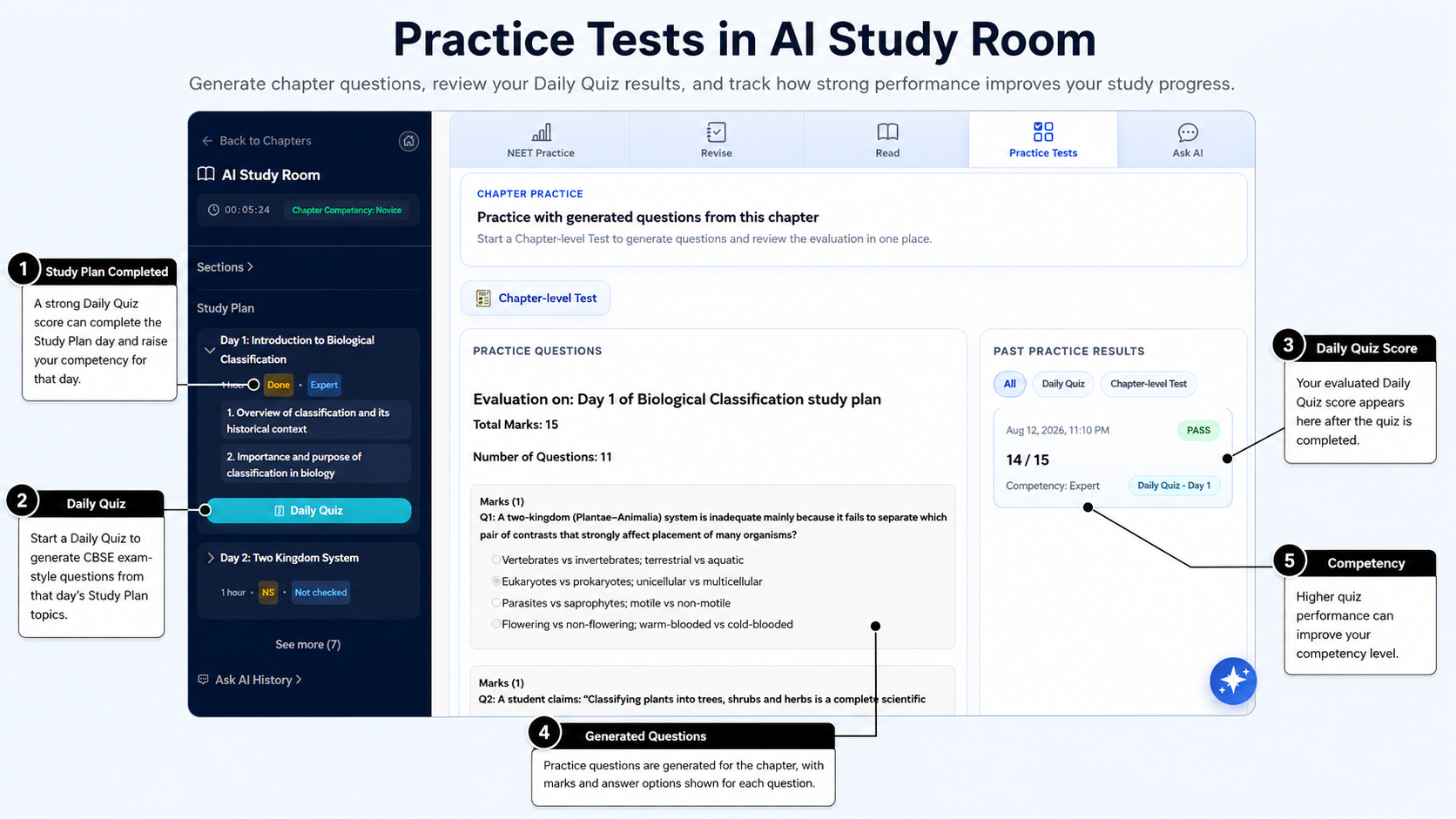
AI Study Room has two ways to check your understanding: a Daily Quiz for one Study Plan day and a Chapter-level Test for the whole chapter.
-
Take a Daily Quiz
Start a Daily Quiz from a Study Plan day. It checks the topics listed for that learning day.
After you complete the quiz and AIandMe checks your answers, it can mark that day Done. The result also contributes to your competency.
You can review the checked result after the attempt is complete.
-
Take a Chapter-level Test
Open Practice Tests and choose the Chapter-level Test when you want to check the whole chapter.
You do not need to complete every Study Plan day before taking it. Its result contributes to chapter competency, but it does not mark Study Plan days Done or directly increase chapter progress.
This makes the Chapter-level Test useful when you want a wider check of the chapter. It is separate from the Daily Quiz completion for each learning day.
-
Understand the questions and results
Practice includes school-style questions based on the learning content. You may see multiple-choice and fill-in-the-blank questions, as well as short and longer written answers.
After you submit your answers, AIandMe evaluates them, gives you a score and provides feedback. Use the feedback to see what you understood and what you may need to study again.
The score belongs to that attempt. It is not the same as your chapter progress or overall competency.
-
Understand your competency
Competency is AIandMe's estimate of how well you currently understand a chapter. It is based on your evaluated Daily Quizzes and Chapter-level Tests.
The five student-visible levels, in order, are:
Level Novice Advanced Beginner Competent Proficient Expert Your competency can change as you complete more evaluated quizzes and tests. It is not the score from one attempt.
Chapter progress tells you how many Study Plan days are Done. Competency tells you what your evaluated assessments currently indicate about your understanding.
-
Review Past Practice Results
Past Practice Results keeps your earlier AI Study Room results for the chapter. You can review Daily Quiz and Chapter-level Test attempts, including the result and feedback available for each attempt.
Use the filters when you want to focus on one type of result.
The history stays connected to the current chapter. Check the result type and learning day, where shown, so you know what each attempt covered.
Use the feedback to review what you understood and what to study again. An earlier result stays available even after you take another eligible attempt.
-
Know the difference
If you want to... Use Check one Study Plan day's topics Daily Quiz Check the whole chapter Chapter-level Test Review earlier AI Study Room results Past Practice Results Create a separate NEET practice test Practice With AI Practice Tests is part of AI Study Room. Practice With AI is a separate area for creating NEET practice tests and is available only with applicable access.
When you choose AI Adaptive practice in Practice With AI, AIandMe can use your chapter competency to adapt the test. Chapters where you need more help can receive more practice, while stronger chapters can receive more difficult questions. Other Practice With AI difficulty choices do not use this adaptive setting.
AI-generated quiz and test actions may use AI Credits. The current amount, when applicable, is shown in AIandMe rather than fixed in this guide.
While a quiz, test or answer check is active, AI Study Room can limit navigation or Ask AI so the current attempt is not mixed with another activity. Finish or exit that attempt before starting a different one.
Progress, competency and score have different meanings, so check the label you are looking at when you review a result.
Return to the AI Study Room overview.