Ask AI
Ask AI helps you while you study in AI Study Room. It already has the class, subject and chapter you are working on. It can use the learning information available in AIandMe to make its help more relevant to you.
Ask AI can also use AIandMe's mapped historical NEET PYQ statistics for the current chapter when that information is available. This can help you understand past-question patterns and decide where to focus.
-
Open Ask AI
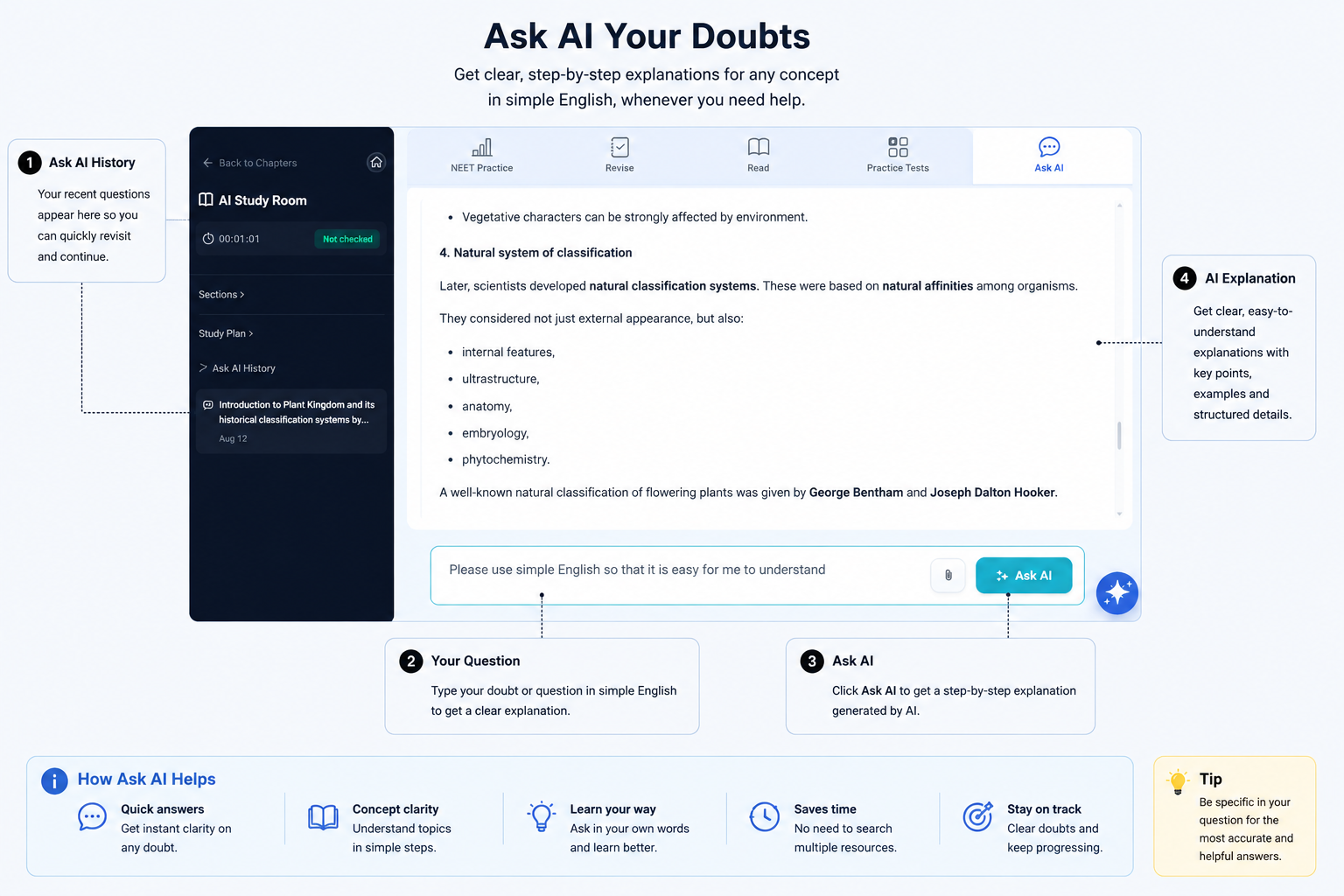
Select the Ask AI tab to open the question area. You may also see an Ask AI action while working in the Chapter Workspace.
Write your question in the message box and send it when you are ready.
The question area stays inside the current chapter so you can ask for help without leaving AI Study Room.
-
Ask about what you are studying
You do not need to explain which chapter you are studying every time. Ask AI can use the class, subject and chapter already open in AI Study Room. It normally has the current section too, where relevant.
Ask AI can explain a concept in a different way, clarify something in the current section, compare related ideas, or help you understand why an answer is right or wrong.
Its subject explanations use the learning material and the chapter or section information available to Ask AI. If your question depends on another detail, include that detail in your message.
Try questions such as:
- "Can you explain this idea in a different way?"
- "How are these two ideas different?"
- "Why is this answer right and the other answer wrong?"
- "Can you explain only the part I misunderstood?"
If a section has several parts, mention the part or idea in your question when it matters.
A clear question that names the idea you do not understand gives Ask AI better context than a very general request.
-
Ask about your progress and what to focus on
When enough learning information is available, Ask AI can use your progress and assessment information to help you understand how your learning is going.
Based on your recent work in AIandMe, this may include your chapter progress, current competency, study activity, recent quizzes and tests, recent scores and pass rate, and areas that may need more attention.
Ask AI uses the available information to give guidance, not just to list statistics. Try questions such as:
- "How am I doing in this chapter?"
- "Based on my recent work, what should I revise next?"
- "Which parts seem to need more attention?"
- "Am I improving in this chapter?"
- "What should I focus on before I take another test?"
Ask AI can only use the learning information available at that time. It may have less progress guidance when you have only recently started or have not yet taken relevant quizzes or tests.
-
Ask about NEET patterns in this chapter
When you are studying a supported Physics, Chemistry or Biology chapter and mapped historical NEET information is available, Ask AI can use those statistics for the current chapter.
It can help you understand:
- how many mapped past NEET questions the chapter has;
- the year-by-year counts for the available NEET years;
- which sections have more mapped PYQs;
- which sections appear more consistently across the available years; and
- where you may want to spend revision time based on those past-question patterns.
Try questions like:
- "Which sections are most important for NEET preparation in this chapter, based on past questions?"
- "Which sections have appeared most consistently across the available NEET years?"
- "How many mapped NEET questions are there from this chapter in each available year?"
- "If I have only one hour to revise this chapter for NEET, where should I focus first and why?"
- "How many PYQs are mapped to this chapter?"
- "Which section has the most mapped PYQs?"
- "Show me the year-by-year PYQ pattern for this chapter."
These are example questions. The answer depends on the mapped NEET information available for that chapter and year range.
You might also ask, "What exact NEET questions came from the most important section?" Ask AI can tell you how mapped past NEET questions are distributed across the chapter and sections, but this statistics information does not include the exact question text. It must not invent or rebuild an unseen past question.
AIandMe's mapped historical NEET PYQ statistics are available through Ask AI. You can ask about these statistics even if your plan does not include NEET PYQ access. To practise the actual available questions, your plan must include NEET PYQ access. Use Practice With AI → NEET PYQ test to practise them. See Set up a NEET PYQ test.
AIandMe importance or focus is based on mapped past NEET questions. It shows historical frequency and focus. It is not an official NTA rating, does not predict future questions and does not mean you should ignore the rest of the syllabus.
-
Ask from your Study Plan
Select a Study Plan topic to prepare its text in Ask AI. You can change or add to the question before sending it.
Selecting the topic alone does not change your Study Plan. Sending the linked question successfully can move that learning day to WIP. It does not mark the day Done.
Complete the Daily Quiz for that learning day when you want to check your understanding and update completion.
-
Use Ask AI History
Ask AI History lists earlier successful questions and answers saved for the current chapter. Select an item when you want to reopen that exchange.
History is chapter-wide. It can include questions from different sections in the same chapter, so check the question before using an earlier answer.
Ask AI can also use the recent conversation while you ask follow-up questions in the current exchange.
-
Know when Ask AI is unavailable
Ask AI may be unavailable while an AI Study Room quiz, test or answer check is active. Finish or exit that activity before asking a new question.
Ask AI uses AI Credits. Check AIandMe for the current credit information before sending your question.
Ask AI does not directly change competency. A linked Study Plan question may move a day to WIP, but only the relevant Daily Quiz can mark that day Done.
Return to the AI Study Room overview.