AI Credits
AI Credits help you use AI-powered features in AIandMe. The Plan & AI Credits page shows the credits available to you, how you are using them, and your recent AI Credit activity.
-
Open AI Credits
Open Learning Insights, then choose AI Credits.
AIandMe opens Plan & AI Credits, where you can see your plan and AI Credit information together.
-
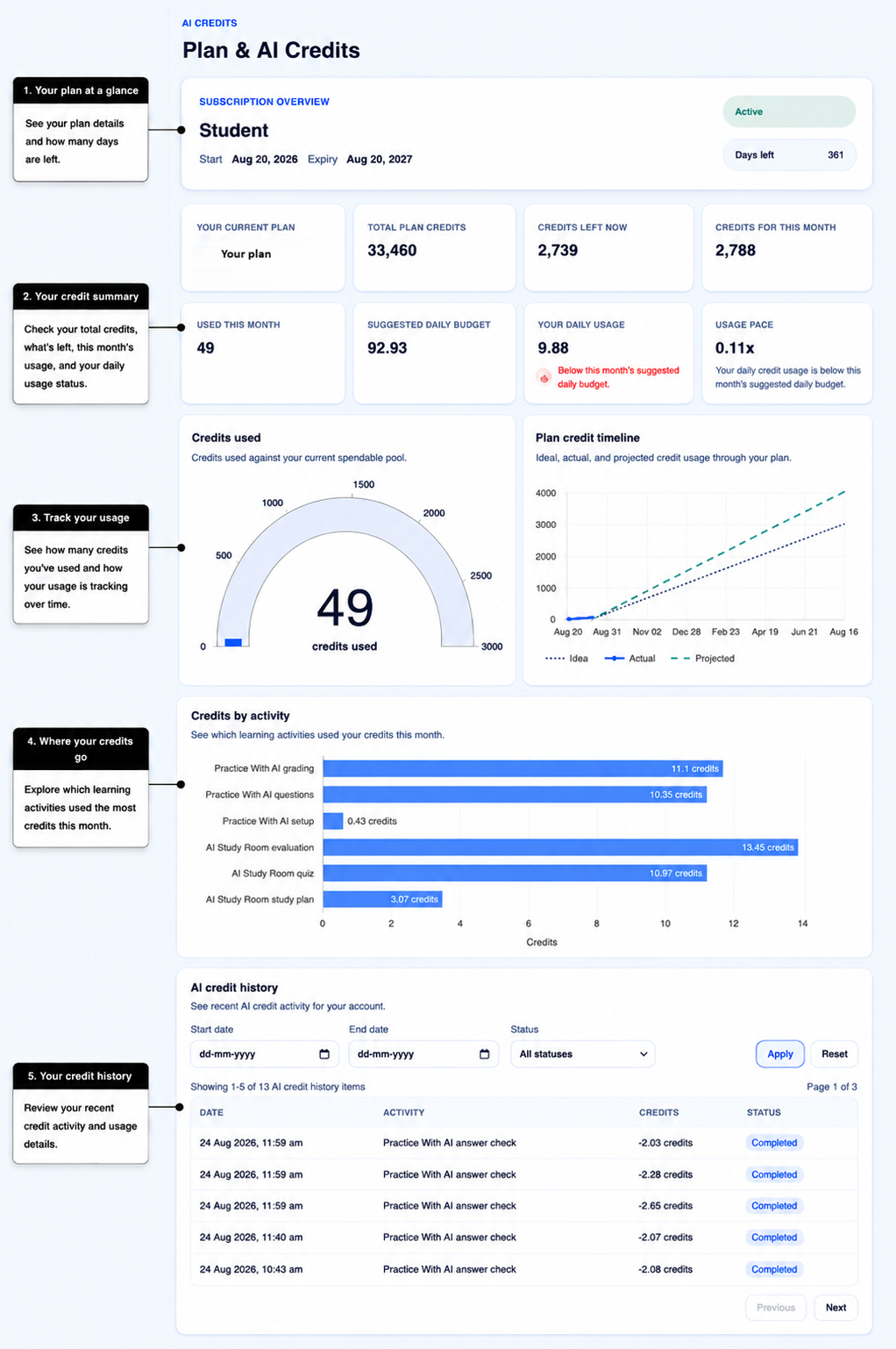
Check your subscription overview
Subscription Overview shows information about your current plan, including:
- your plan;
- the start date;
- the expiry date;
- the current plan status; and
- the number of days left.
Use the live page for your current plan and credit information. The values shown can differ depending on your plan and where you are in your subscription period.
-
Understand your AI Credit summary
The summary cards help you understand how many credits you have and how you are using them:
- Current Plan shows the plan linked to your current subscription.
- Total plan credits shows the total credits linked to your current subscription.
- Credits left now shows the credits currently available for you to use.
- Credits for this month shows the credits for your current monthly credit period.
- Used this month shows the AI Credits used during the current monthly credit period.
- Suggested daily budget gives you a simple daily pace for the current monthly credit period.
- Your daily usage shows your average daily AI Credit use so far in the period.
- Usage pace compares your daily usage with the suggested daily budget.
The suggested daily budget is guidance. It is not a daily spending limit.
Your actual AI Credit use depends on the AI-powered activities you choose.
-
See how your credits are being used
The charts give you three different views of your AI Credit activity.
Credits used shows how many credits you have used compared with the credits currently available to you.
Plan credit timeline shows your credit usage through your plan. It can compare your actual usage with a guide showing what steady usage would look like. When available, it can also show an estimate of how your usage may continue.
This estimate is based on your recent usage. It is not a guarantee of how many credits you will use.
Credits by activity shows which AIandMe activities have used AI Credits during the current month.
-
Review your AI credit history
AI credit history shows recent AI Credit activity for your account.
Each row can show:
- Date
- Activity
- Credits
- Status
You can filter the list using a Start date, End date, and Status.
The available statuses can include:
- Completed — the AI Credit activity completed.
- Returned — the AI attempt could not be completed, so no credits were charged.
- Under review — the activity is still being reviewed.
- Failed — the activity did not complete successfully.
- In progress — the AI activity is still being processed.
Select Apply after changing the filters.
Select Reset to clear the filters.
Use Previous and Next when there is more than one page of AI Credit history.
-
Understand an AI credit status message
AIandMe may show an AI credit status message when AI-powered actions are not currently available.
Follow the message currently shown in AIandMe.
When AI features are paused, non-AI learning and review can remain available.
Your credit balance can change. Use Credits left now for your current balance.
-
Know where to check payments and credit additions
Plan & AI Credits is mainly for understanding your AI Credit balance and usage.
Use Receipts & Payments when you want to review payment history, receipts, or credit additions linked to your account.
Use AI Credits at a comfortable pace
The credit summary and usage charts can help you see whether your recent usage is above, close to, or below the suggested pace for your current monthly credit period.
You do not need to use the same number of credits every day. Use the pacing information as a guide while choosing the AI-powered help that is useful for your learning.
Use the Learning Insights overview when you want to understand your AI Study Room progress.
Use Testing Insights when you want to understand patterns across your completed Practice With AI tests.
Use NEET Stats when your plan includes NEET learning features and you want to review NEET chapter priorities and progress.
Where you can use AI Credits
You can use Ask AI while studying in AI Study Room.
Some AI-powered actions in Practice With AI can use AI Credits. When available, AIandMe shows the current credit estimate or other credit information before you continue.
Refreshing Mentor AI can also use AI Credits. Check the confirmation shown in AIandMe before you refresh it.