Practice With AI
Practice With AI helps you prepare for NEET with practice tests based on what you want to work on. You can practise with fresh questions, previous-year NEET questions or questions you want to revisit.
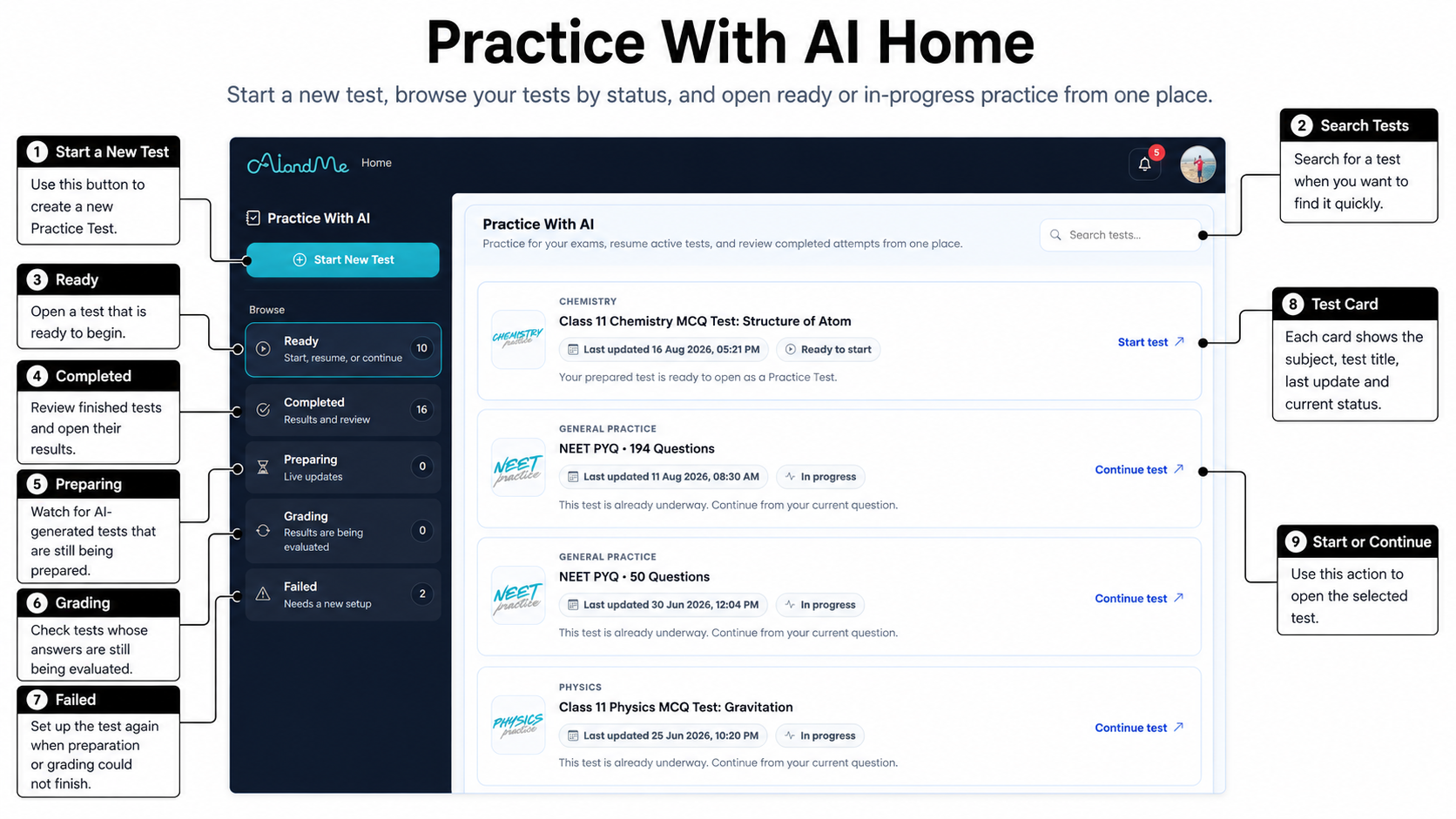
-
What you can do in Practice With AI
Select Start New Test when you want to create a Practice Test. From the same page, you can also:
- start a test that is ready;
- continue or resume an unfinished test;
- check whether a test is being prepared or graded;
- review a completed test; and
- select Set up again, when it is available, if AIandMe could not finish preparing or grading a test.
Your available choices depend on your plan and the learning content available to you.
-
Choose how you want to practise
There are three ways to choose questions:
- AI-generated test — fresh questions. Create new questions for the chapters and sections you select.
- NEET PYQ test — past NEET questions. Practise previous-year NEET questions currently available in AIandMe.
- Revision test — questions you need to revisit. Practise questions you previously answered incorrectly or marked Guessed when they are available for revision.
Think of the flow as: choose your practice → take the test → review the result → decide what to practise next.
-
Create an AI-generated test
An AI-generated test creates fresh questions for the chapters and sections you select. You can choose:
- a Learning-based or NEET-based question style;
- AI-Guided or Exam-based evaluation;
- enrolled chapters;
- all available sections or selected available sections;
- AI Adaptive, Easy, Medium or Hard difficulty; and
- a question count that fits the chapters and sections you selected.
AI Adaptive uses your current learning level in the selected chapters to choose an appropriate difficulty. It can give you more practice in chapters where you need more help.
Before you create the test, the Review step can show an estimate of the AI Credits it may use. Check the estimate shown in AIandMe before you continue.
An AI-generated test may need time to prepare. It can appear under Preparing, and AIandMe can notify you when it is ready.
-
Practise with NEET PYQs
A NEET PYQ test uses previous-year NEET questions currently available in AIandMe. This choice is available only when your plan includes the relevant NEET access.
Select one available year. You can then use All available questions or Customize test. The customised flow lets you narrow the available questions by chapter and section.
At Review, choose Practice set to start with questions not yet used in your PYQ tests. Choose Full selection to use every question in your current selection.
AIandMe shows the NEET PYQs currently available for the year and selection you choose. A PYQ test may not contain every question from an official paper. Previous-year questions do not predict what will appear in a future NEET exam.
-
Build a Revision test
A Revision test can bring back questions from earlier completed tests that you:
- answered incorrectly; or
- marked Guessed.
Use the available chapter and section filters to focus your revision. A useful learning pattern is: notice a mistake or uncertainty → understand it → practise it again.
Not every question from an earlier test will always be available for a Revision test.
-
Choose when you want feedback
AI-Guided checks each answer you submit and gives you feedback while you work through the test.
Exam-based lets you work through the test without immediate answer checking. AIandMe checks your answers after you select Finish Test.
A question timer is available during tests. An overall countdown applies to Exam-based tests. It does not run in AI-Guided mode.
-
Understand your test status
Practice With AI groups tests by what is happening now:
- Ready: start a test that is ready, or continue or resume an unfinished test.
- Preparing: AIandMe is preparing an AI-generated test.
- Grading: AIandMe is still checking your submitted answers.
- Completed: your Practice Test Result is ready to review.
- Failed: AIandMe could not finish preparing or grading the test. When available, select Set up again.
Not every test passes through every status. NEET PYQ and Revision tests can become ready without waiting for fresh AI-generated questions.
-
While you take a test
You can move between questions, Bookmark a question and mark a question Guessed. Marking Guessed records that you were unsure. It does not change your score by itself.
Select Pause test when you want to pause without leaving. The save control saves your progress, pauses the test and exits, so you can continue later. Select Finish Test when you are ready to submit the test.
For a guide to the screen and controls, see Inside Your Practice Test.
-
Review your result
Select View result for a completed test to open its Practice Test Result. This helps you understand one test. Depending on the information available for that test, it can show:
- score and percentage;
- accuracy and attempt rate;
- correct, incorrect and unanswered questions;
- pacing;
- subject, chapter and section breakdowns; and
- questions to review, including Guessed questions and other questions that may need your attention.
Testing Insights is different. It helps you look for patterns across several completed tests. Use the Practice Test Result for one attempt and Testing Insights for the wider picture.
-
Practice With AI and AI Study Room
Practice With AI does not replace the tests inside AI Study Room.
- A Daily Quiz checks the topics for one Study Plan day.
- A Chapter-level Test checks the whole chapter.
- Practice With AI is a separate place for broader NEET practice using fresh questions, available PYQs or questions you need to revise when they are available.
Use the activity that matches what you want to check, then return to your learning or revision.