Practice With AI Test Setup
When you select Start New Test, AIandMe takes you through a few setup steps before your test begins. You choose the type of questions you want, how you want feedback, what you want to practise, and then review your choices before starting.
-
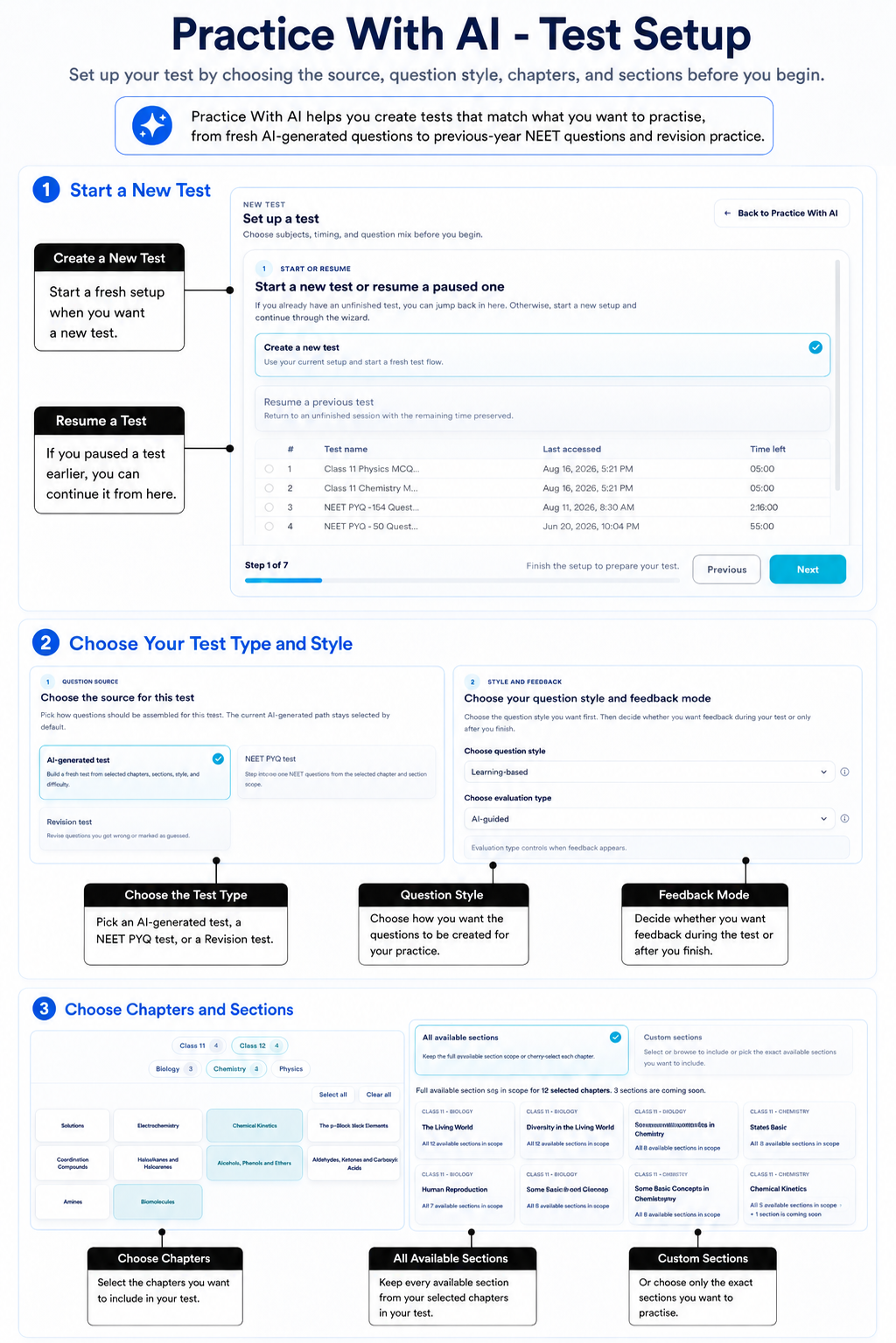
Start a new test or continue one you paused
Open Practice With AI and select Start New Test.
Select Create a new test when you want to start a fresh setup. If an unfinished or paused test is available, you may also be able to select Resume a previous test and continue it.
-
Choose the type of test you want
Choose the question source that matches what you want to practise.
- AI-generated test: fresh questions created for the chapters and sections you choose.
- NEET PYQ test: previous-year NEET questions currently available in AIandMe. Access to the actual questions depends on your NEET plan.
- Revision test: questions from your own earlier Practice Tests that you got wrong or marked Guessed, where available.
Each detailed guide explains the choices for that test type.
-
Choose how you want the test to work
The choices shown can change depending on the type of test you selected.
Where available, choose when you want feedback:
- AI-Guided checks answers and gives you feedback while you work.
- Exam-based waits until you finish before showing checked answers.
For an AI-generated test, you can also choose the question style.
-
Choose what you want to practise
Choose the available chapters you want to include.
You can then keep All available sections or choose Custom sections where that choice is supported. This lets you make the test as broad or as focused as you need.
-
Complete the choices for your test type
Each question source has a few choices of its own:
- An AI-generated test can include difficulty and question-count choices.
- A NEET PYQ test can include a year, question scope, and Practice set or Full selection.
- A Revision test uses the revision questions currently available from your earlier tests, with available chapter and section filters.
See Set up an AI-generated test, Set up a NEET PYQ test, or Set up a Revision test when you need the full steps for one source.
-
Review your choices and start
At Review, check your test type, feedback choice, chapters, sections and question count where they are shown.
For an AI-generated test, select Finish Setup. For a NEET PYQ or Revision test, select Start Test when your choices are ready.
AI-generated questions may need time to prepare. NEET PYQ and Revision tests can become ready more directly when questions are available.
When your test is ready, see Inside Your Practice Test.