Learning Insights overview
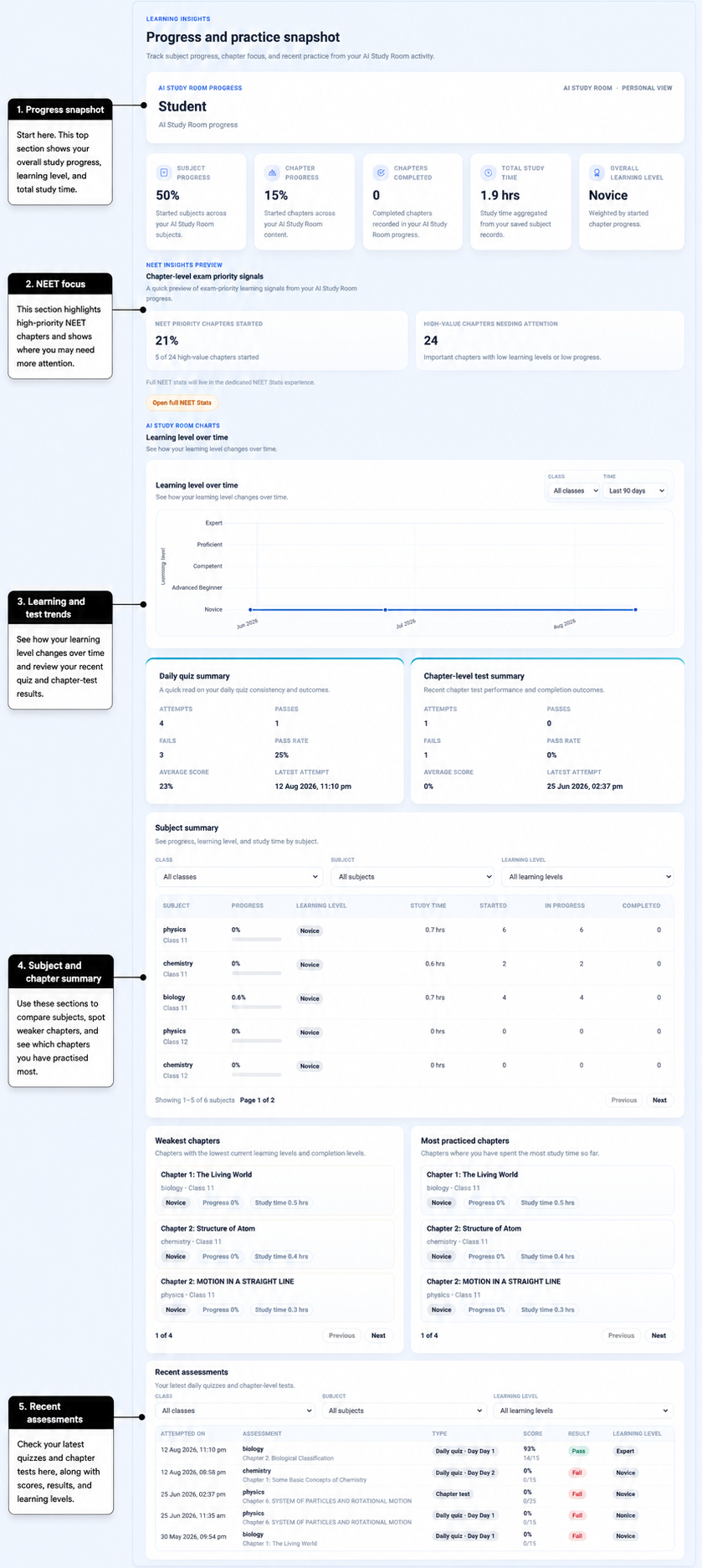
Learning Insights brings together what AIandMe knows from your AI Study Room activity. It shows what you have started, your study time, learning levels, quizzes, and chapter tests so you can understand how your learning is developing and where you may want to look more closely.
-
Open Learning Insights
Open Learning Insights, then open the main Learning Insights page. This is your summary of learning activity from AI Study Room.
-
Read your progress and study-time snapshot
The five cards at the top give you a quick picture of your learning:
- Subject Progress is the percentage of the subjects in each class included in your learning that you have started. The same subject in Class 11 and Class 12 counts as two separate learning areas.
- Chapter Progress is the percentage of the chapters included in your learning that you have started. It is not your average chapter completion.
- Chapters Completed counts chapters where Study Plan progress reaches 100%.
- Total Study Time is your recorded active study time in AI Study Room. It does not include time spent in Practice With AI tests.
- Overall Learning Level shows your current learning level across your started chapters. The next section explains what it means.
-
Understand your learning level
AIandMe uses five named learning levels:
- Novice
- Advanced Beginner
- Competent
- Proficient
- Expert
Your learning level reflects what AIandMe has learned from your checked Daily Quizzes and Chapter-level Tests in AI Study Room. It is not based on Practice With AI tests.
For your overall level, started chapters with more learning progress have more influence. If there is not enough learning information yet, AIandMe may show that there is not enough data.
-
See how your learning level changes over time
Learning level over time shows updates from your checked AI Study Room quizzes and chapter tests. Use Last 30 days, Last 90 days, or All assessments to choose the period you want to see. A class control appears when it is useful for the subjects in each class included in your learning.
Look for the direction across several results rather than judging yourself from one quiz or test. One result does not prove that you are permanently improving or declining.
Practice With AI tests do not drive this chart.
-
Review your AI Study Room practice
Daily Quiz summary can show your attempts, passes, fails, pass rate, average score, and latest attempt for AI Study Room Daily Quizzes.
Chapter-level Test summary shows the same kind of information for AI Study Room Chapter-level Tests.
These summaries do not include Practice With AI tests. Recent assessments lets you review recent Daily Quiz and Chapter-level Test results one by one.
-
Compare subjects and find chapters to look at
Subject summary helps you compare progress, current learning level, study time, and the number of chapters started, in progress, and completed. You can use the class, subject, and learning-level filters to narrow the list.
The Progress shown in a subject row is different from the top Subject Progress card. The top card shows how many subject and class areas you have started. A subject row shows how far that subject's chapters have progressed overall.
Weakest chapters can help you find started chapters with lower current learning levels or progress. They are areas to look at more closely, not failures.
Most practiced chapters shows the chapters where you have recorded the most AI Study Room study time. More study time does not automatically mean a higher learning level.
When mapped NEET priority information is available for subjects you study, NEET Insights Preview can show NEET Priority Chapters Started and High-Value Chapters Needing Attention. Full NEET Stats is available only when your plan includes NEET learning features.
Look at the whole picture
Learning Insights is most useful when you look at several signals together. Progress, learning level, quiz results, and study time can tell different parts of the story.
When available in your plan, Testing Insights looks at patterns across Practice With AI tests. Full NEET Stats provides deeper NEET tracking when it is included in your plan.