How can I improve my NEET speed without sacrificing accuracy?
NEET is not only about knowing the answer. You also need enough time to work through the full paper.
But simply trying to answer every question faster can create a different problem: rushing questions that you could have answered correctly.
A better goal is:
Answer carefully enough to be accurate, while learning where you are spending more time than you need.
AIandMe can help you examine both sides of that balance.
-
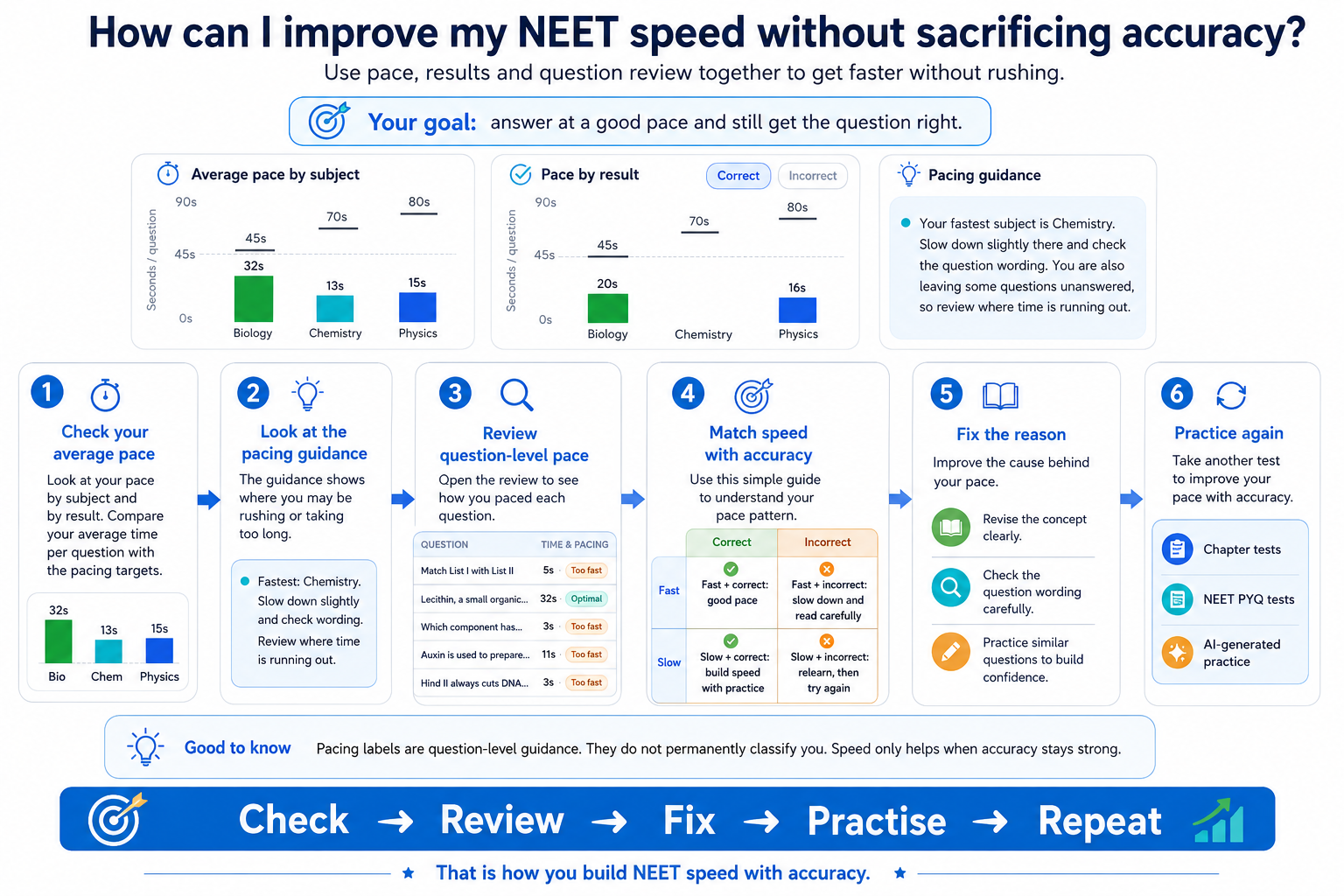
First, find out how long you are actually taking
When you practise in Practice With AI, AIandMe records the time you spend on questions.
After completing tests, Testing Insights can show your answering pace once you have enough timed answers for a useful pattern to show.
You can look at your average pace by subject and also compare how quickly you answered questions that were Correct and Incorrect.
Before trying to become faster, understand how you are answering now.
-
Don't assume faster always means better
A very fast answer can be good if you understood the question immediately.
But it can also mean that you:
- rushed the reading;
- missed an important word;
- chose the first familiar option;
- guessed;
- or made a simple calculation error.
Likewise, taking longer is not automatically bad. Some questions genuinely need more reasoning.
AIandMe can show question-level pacing guidance such as:
- Too fast
- Optimal
- Slow
Use those labels as guidance for reviewing your approach, not as marks for whether you answered well.
-
Always look at pace together with the result
Pace becomes much more useful when you ask:
“Was I fast and correct, or fast and wrong?”
For example:
Fast + correct
You may know the concept well and recognise the question efficiently.
Fast + incorrect
You may have rushed, guessed or missed part of the question.
Slow + correct
You understood it, but your solving method may be taking too long.
Slow + incorrect
The concept or method may need more work before speed should become the priority.
Do not try to fix all four situations in the same way.
-
Look for patterns by subject
Your natural answering pace may not be the same in Physics, Chemistry and Biology.
Testing Insights can show Average pace by subject once you have answered enough questions for a useful pattern to show.
Use this to ask:
- Which subject is taking most of my time?
- Am I rushing one subject more than another?
- Is slow solving concentrated in a few chapters?
- Are my faster answers also accurate?
Do not force every subject to the same pace. Understand where your available exam time is going.
-
Review individual questions that look unusual
Averages can hide important details.
Look at questions where your pace stands out.
For a Too fast incorrect answer, ask:
- Did I read the whole question?
- Did I notice words such as not, except or incorrect?
- Did I calculate before choosing the option?
- Was I actually guessing?
For a Slow answer, ask:
- Did I know the concept?
- Did I take an unnecessarily long route?
- Was there a formula or relationship I struggled to recall?
- Did I keep changing my answer because I was unsure?
This turns the timing information into something you can act on.
-
Fix understanding before trying to force speed
If a question was slow because you did not understand the concept, repeatedly trying to solve it faster is unlikely to help.
Go back to the relevant learning.
You can use:
- Read for the fuller explanation;
- Revise for the important ideas;
- Ask AI for a specific doubt;
- Explain With AI for an eligible checked Practice Test answer.
Once the method is clearer, practise again.
Speed often becomes easier when the underlying reasoning becomes more familiar.
-
Practise the exact area that is slowing you down
You do not always need another broad test.
If one chapter or section is repeatedly taking too long, create focused practice around that area.
In Practice With AI, you can target selected chapters and sections with an available NEET PYQ test or fresh AI-generated test.
That lets you practise the area where you need improvement instead of spending most of your time on topics you already handle comfortably.
-
Use Exam-based practice when you want to practise time management
When you want to practise under a more exam-like time constraint, Exam-based Practice Tests use an overall countdown as well as question timing.
AI-Guided tests let you receive feedback as you work and do not use that overall exam countdown.
You can use them for different purposes:
AI-Guided
Useful when learning and understanding mistakes during practice is the main goal.
Exam-based
Useful when you also want to practise managing your available test time.
Neither mode is automatically better. Choose based on what you are trying to improve.
Learn more in Practice With AI Test Setup.
-
Measure improvement across several tests
Do not judge your speed from one unusually fast or slow test.
As you complete more comparable tests, Testing Insights can show trends in your performance. Some views need several completed tests before a useful pattern appears.
Look for changes such as:
- accuracy improving while pace stays manageable;
- slow questions becoming less frequent;
- fewer fast incorrect answers;
- a subject becoming more consistent.
Those patterns are more useful than trying to beat one previous time.
Build speed without learning to rush
A useful cycle is:
Practise → Check accuracy and pace → Find fast mistakes and slow questions → Understand why they happened → Relearn or improve the method → Practise the area again
The goal is not simply:
“How can I answer faster?”
A better question is:
“How can I solve accurately without spending more time than I need?”
AIandMe shows your timing and results. Use them together to work towards that balance.