Study Plan
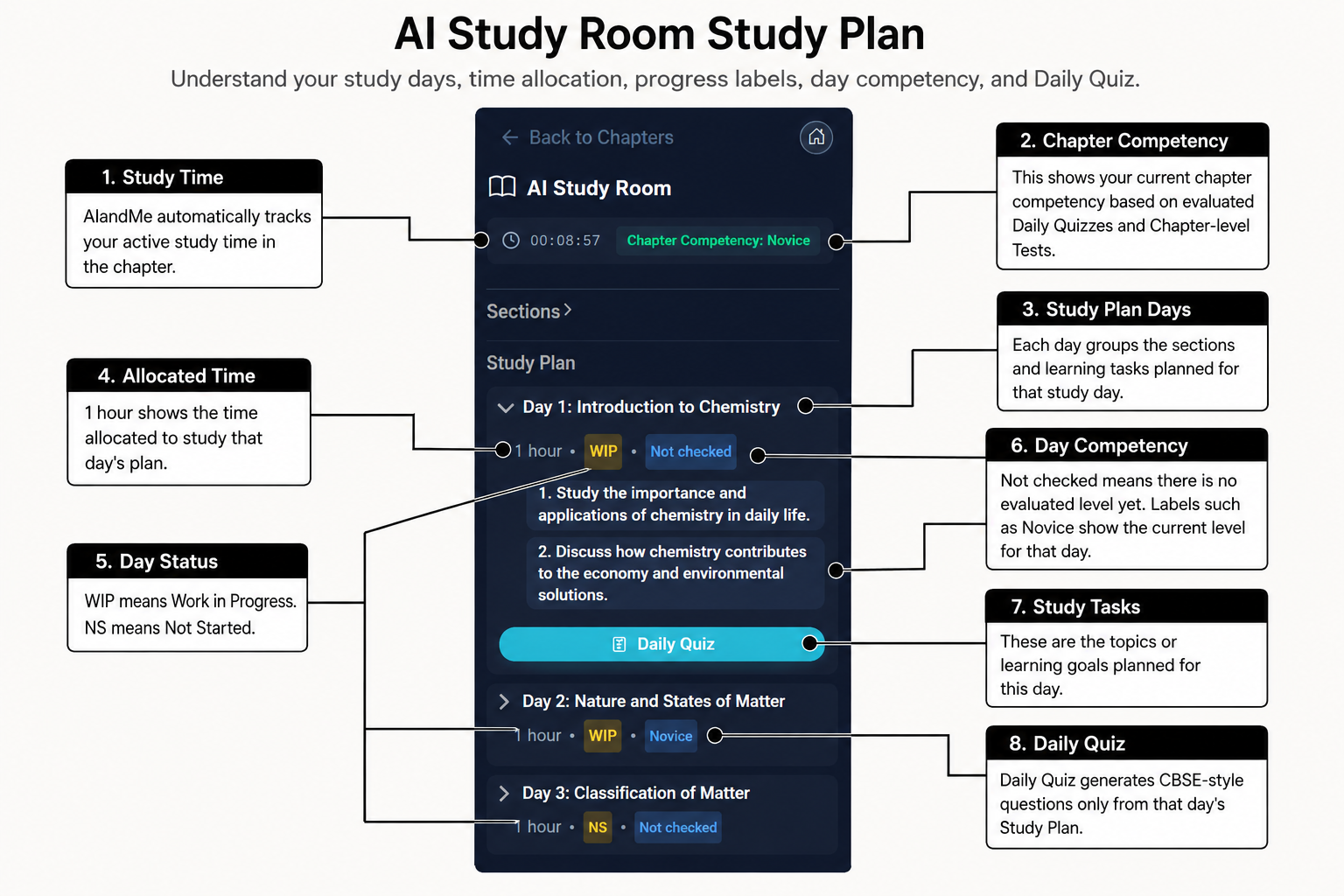
Your Study Plan breaks a chapter into smaller learning units. It helps you see what to study and which learning days you have completed.
-
Understand your Study Plan
AIandMe prepares the Study Plan when you start a chapter. Each Day is the next learning unit in the plan, such as Day 1 or Day 2.
These are not calendar dates. You can follow them in order without matching them to a particular date.
Each learning day contains a title and topics. When you return to the chapter later, the same prepared plan and saved statuses are shown.
-
Understand the suggested time
The time beside a learning day is suggested study time for that unit.
It is not a countdown or a deadline. It is also different from the study timer at the top of the Chapter Workspace, which records active time.
Spending the suggested time does not automatically mark the day Done. Use it only as a planning guide for your study session.
-
Understand the statuses
What you see What it means NS Not started WIP In progress Done Completed Not checked Your understanding has not been assessed yet Status and competency are separate. A day can be in progress without having a checked competency level.
Not checked is the competency message for a day that does not yet have a checked Daily Quiz result. It is not another progress status.
-
Use a Study Plan topic
Select a topic when you want to ask about it. AIandMe prepares that topic in Ask AI.
Selecting the topic does not complete the day. If you send the linked question successfully, the day can move to WIP.
You can edit the prepared text before sending it. Ask AI helps with the topic, but a successful answer is still different from completing the Daily Quiz.
-
Complete a Study Plan day
Select Daily Quiz for the learning day you want to check. The quiz covers the topics in that day.
After you complete the quiz and AIandMe checks your answers, the day can become Done. Done days increase the chapter percentage shown on Subject Home.
Starting the quiz can show that the day is in progress. Only a completed result that marks the day Done raises the chapter percentage.
-
Understand progress and competency
Progress tells you how much of your Study Plan you have completed. It shows how many Study Plan days are Done.
Competency tells you how your evaluated Daily Quizzes and Chapter-level Tests show your current understanding of the chapter.
Reading, revising and active study time do not directly change either value. Use Practice Tests to understand how the two assessment types differ.
The study timer is a third measure. It records active time for Learning Insights, but it does not decide whether a day is Done and does not create a competency level by itself.
Return to the AI Study Room overview.