Practice Test Result
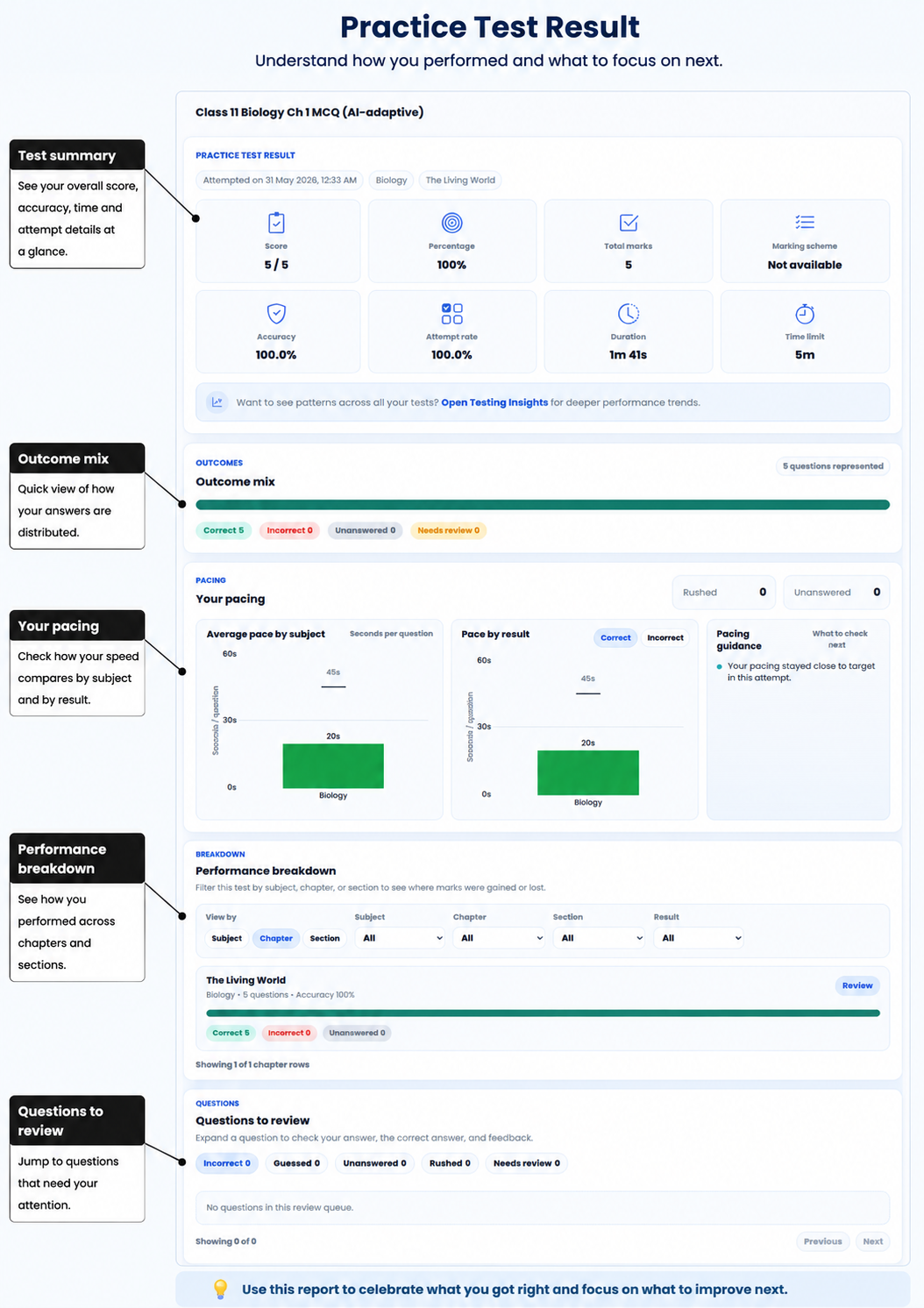
Your Practice Test Result is not just your score. It helps you see what you got right, what you missed, where you were unsure and how you used your time in one completed Practice Test.
-
Open your Practice Test Result
Open Practice With AI, go to Completed and select View result.
The result opens with Test result summary selected. You can move between the summary and each question from the test.
-
Understand your score and percentages
The result can show:
- your score and maximum score;
- score percentage and whether you passed;
- accuracy;
- attempt rate;
- total duration and the test time limit; and
- correct, incorrect and unanswered questions, plus questions marked Needs review.
Accuracy tells you what percentage of the questions you attempted were correct. Attempt rate tells you what percentage of all the test questions you answered.
Read them together. For example, if your accuracy is high but your attempt rate is low, you may be getting the questions you answer right but leaving too many unanswered.
-
See where you rushed or took longer
Your pacing uses the time recorded for each question and the timing guide for its subject.
You can compare the average time you took on correct and incorrect answers. AIandMe can mark some wrong answers as Rushed when you answered them much faster than expected. Unanswered questions also stay visible.
Timing does not change your score by itself. Use it to spot questions where you may need to slow down or practise solving more quickly.
-
Check subject, chapter and section results
Performance breakdown lets you switch between subject, chapter and section views when AIandMe can group the questions that way.
Use Subject, Chapter and Section views to see where you did well and where you may need another look. The rows can show question counts, accuracy and how many answers were correct, incorrect, unanswered or marked for review.
These breakdowns are only for this test. They do not describe your progress across all your learning.
-
Find questions to review
Under Questions to review, you can review:
- Incorrect;
- Guessed;
- Unanswered;
- Rushed; and
- Needs review.
A correct answer marked Guessed still earns its marks, but it tells you that you were not confident. Both correct and incorrect Guessed answers can appear here, making them useful questions to revise.
Bookmarks are not a separate list in your Practice Test Result.
-
Open one question
Expand a question in a review list to check your answer, the correct answer and the available feedback.
Select Review to open the question. Answers cannot be changed after the test is Completed.
When it is available for the checked question, you can also use Explain With AI to open or create an explanation.
-
Choose what to practise next
Look at more than your score.
For example, revisit a chapter with several incorrect answers, review a section with Guessed answers, or practise a method again when incorrect answers were rushed.
AIandMe gives you the evidence from this test. Use it to decide what you want to revise or practise next.
-
Use Testing Insights for the bigger picture
Practice Test Result explains one completed test.
Testing Insights looks for patterns across multiple completed tests. Use this result for the details of one test, and use Testing Insights for the bigger picture.
If your test has not reached Completed yet, see Grading. For the complete test journey, see the Practice With AI overview.